

Logging into a betting account usually takes only a few seconds. Enter the required credentials, complete any additional verification and the platform remembers the session so the user does not have to repeat the process every time the app or website opens. That convenience is useful, particularly for people who regularly switch between a phone and computer, but it also creates a question that many account interfaces have historically answered poorly: where is the account currently logged in?
A user may have signed in from a home laptop months ago, opened the account on a previous phone or temporarily used another device and forgotten about it. When platforms provide no clear overview of those sessions, account access becomes difficult to monitor. More detailed session controls can change that by showing which devices are connected, when they were last active and giving users a direct way to remove access they no longer recognize or need.
A password is only one part of account access
People often think about account security almost entirely in terms of passwords. A strong password matters, but the situation becomes more complicated once a successful login creates a persistent session.
The user may close the browser without actually signing out. A mobile device can remain authorized for weeks, while another browser may continue to hold an active session in the background.
That means the useful question is not simply “Who knows my password?” It is also “Which devices already have access?” A session management page can answer that second question without requiring the user to understand cookies, authentication tokens or other technical details behind the login system.
An active-device list makes invisible access visible
A useful session screen does not need to contain much information. Its main purpose is to turn account access into something the user can inspect.
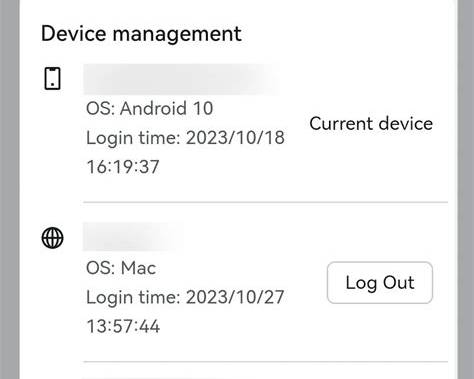
A platform could show a list similar to this:
| Session information | What it tells the user |
|---|---|
| Device type | Phone, tablet or computer |
| Browser or app | How the account was accessed |
| Approximate location | General origin of the session |
| Last active | When the device recently used the account |
| Current device | Which session the user is using now |
| Sign-out control | Ability to terminate another session |
The exact level of information will vary between platforms, but even a simple device list is more useful than leaving every active session invisible.
Recognizing the current device prevents unnecessary confusion
Imagine opening account settings and seeing three sessions: Chrome on Windows, Safari on iPhone and another Chrome session. Without additional context, the user may wonder whether one of them belongs to someone else. Marking the current session as “This device” immediately removes part of that uncertainty.
The interface can also provide recognizable details such as the operating system and approximate last-active time. These small pieces of context help users distinguish their own activity from something that deserves investigation. Security information becomes much more useful when it can be interpreted quickly.
Last-active timestamps can reveal forgotten sessions
Not every unfamiliar-looking session indicates unauthorized access. A device last active six months ago might simply be an old laptop. Another session could belong to a browser the user rarely opens. Showing activity dates provides useful context.
A session accessed five minutes ago is obviously more relevant than one that has been inactive for months. Users can prioritize recent activity instead of treating every historical login as equally suspicious. Timestamps also make account cleanup easier. Someone who recognizes an old device can simply remove it without needing to change everything else.
Remote sign-out gives users a direct response
Finding an unfamiliar session is only useful if the user can do something about it. Remote sign-out provides the most obvious action. Instead of physically accessing the other device, the account holder can terminate its session from the device currently in hand.
This is useful in several ordinary situations:
- a phone has been lost or replaced;
- an old laptop was sold or given away;
- the user logged in on a shared computer;
- a browser session was left open elsewhere;
- an active device is no longer recognized.
The control should be clearly labeled and should explain what will happen. “Sign out this device” is more understandable than technical language about revoking tokens or invalidating sessions.
“Sign out everywhere” solves a different problem
Removing sessions individually works when the user recognizes most devices and wants to disconnect one. Sometimes the situation is less clear. If several sessions look unfamiliar, or the user suspects that account credentials may have been exposed, a Sign out of all other devices option provides a faster response.
That action can terminate every session except the one currently being used, after which the user can update credentials or security settings. Platforms should distinguish this clearly from an ordinary logout button. Accidentally signing out every device because two controls look identical creates frustration rather than security.
Login alerts can make session controls proactive
A device list is useful when users decide to check it. Login alerts can surface important information earlier. When a new device accesses the account, the platform can send a notification containing enough context to recognize the event. That might include the time, device category and approximate location.
The wording matters. A useful notification does not need to create panic. It can simply say that a new login was detected and provide a direct path to review account activity if the user does not recognize it. This changes session management from something users discover in settings into an active account-protection feature.
New device and new location are not the same thing
Login systems need to be careful about what they classify as unusual. A person can use the same phone from several locations during an ordinary day. Mobile networks can also make location information appear different even when the user has barely moved. A genuinely new device is often a clearer signal than a minor geographic change.
Platforms can therefore consider several factors together rather than treating every different location as suspicious:
| Signal | Possible interpretation |
|---|---|
| Known device, normal browser | Likely routine access |
| New device | Worth notifying the user |
| New device and unusual region | Higher-value security signal |
| Multiple rapid login attempts | May require additional verification |
| Old session suddenly active | Worth reviewing |
| Password recently changed | Existing sessions may need revalidation |
The goal is to identify meaningful changes without turning routine account use into a constant stream of warnings.
Betting accounts create a strong reason for clear session history
Account access matters on many types of websites, but betting accounts can contain balances, transaction history, personal details and records of wagering activity. That makes unexplained changes particularly noticeable.
If a user sees a wager they do not remember placing or account information they did not change, login history can provide another source of context. A recent unfamiliar session may help explain why something looks different.
Session history is not a replacement for transaction records or security support. It complements them. When several parts of the account preserve clear records, users have a better chance of understanding what happened.
Deposits and withdrawals can trigger additional verification
Not every action needs the same security threshold. Reading sports markets and changing payment information are very different account activities. A platform can keep ordinary browsing convenient while requiring additional confirmation for sensitive actions.
For example, a new device might be allowed to access basic account information after login but require another verification step before changing payment details or initiating certain account changes.
This approach is sometimes described as risk-based or step-up authentication. From the user’s perspective, the important part is simpler: routine actions remain quick, while unusually sensitive actions receive another check.
Session expiration needs a balance
Platforms could theoretically improve security by logging everyone out constantly. That would also make the service irritating to use. Session expiration therefore requires balance.
A trusted personal phone may reasonably remain signed in longer than a browser session on a shared computer. A period of inactivity might also trigger reauthentication before sensitive account actions even if the general session remains active. The right duration depends on the service and its security model.
What matters from a UX perspective is predictability. If a session expires, the user should understand that another login is required rather than assuming the website has malfunctioned.
Mobile users need especially simple controls
Session management can easily become too technical. Desktop interfaces have enough space to display detailed tables, but most betting activity increasingly takes place on smaller screens. A mobile security page therefore needs to prioritize the information that helps users make a decision.
A device card might show:
iPhone — Safari
Current device
Active now
and another:
Windows PC — Chrome
Last active: September 5
[Sign out]
That is often enough. Detailed IP information or advanced technical data can remain available when necessary, but it should not dominate the basic interface.
Device names can be more useful than raw technical identifiers
A string of numbers may be useful to a security engineer but meaningless to most account holders. Human-readable descriptions work better. “Android phone using Chrome” immediately gives the user something recognizable. “Session ID 84729-AF38” does not.
Platforms can still store technical identifiers internally. The interface simply translates them into information that helps someone decide whether a session belongs to them. This principle applies throughout account security: exposing more data is not automatically the same as providing more clarity.
Password changes should explain what happens to existing sessions
Changing a password creates another important session-management question. Does every other device remain logged in, or are existing sessions terminated? Users should not have to guess.
If changing credentials automatically logs out other devices, the confirmation screen can state that clearly. If sessions remain active, the account can offer an additional option to terminate them.
This becomes particularly important when a password is being changed because the user suspects unauthorized access. The safest response is difficult to execute when the interface hides what will happen next.
Account recovery should connect with session security
A forgotten password and a suspected account compromise may begin through the same recovery interface, but they represent different situations. Someone who simply forgot a password mainly needs to regain access.
Someone who believes another person has accessed the account may also need to terminate sessions, review recent activity and update security information.
Platforms can connect these actions. After a password reset, the user could be prompted to review active devices. That adds very little friction while helping ensure that account recovery does not stop at creating another password.
Two-factor authentication works better with device visibility
Two-factor authentication can make unauthorized logins more difficult, but it does not eliminate the usefulness of session management. A device authenticated earlier may still hold an active session. Users may also deliberately trust certain personal devices so they do not need to complete the same verification step constantly. An active-session page provides visibility into those trusted relationships.
The two features therefore solve different parts of the same problem:
| Security feature | Main purpose |
|---|---|
| Password | Establish basic account credentials |
| Two-factor authentication | Add another verification step |
| Login alert | Inform the user about new access |
| Session list | Show where access currently exists |
| Remote logout | Remove existing access |
| Activity history | Provide context after account changes |
Combining them gives users both prevention and visibility.
Shared devices deserve special treatment
Not everyone accesses betting platforms exclusively from a personal smartphone. Some users may occasionally sign in through a family computer, workplace device or another shared browser. Persistent sessions become more sensitive in those environments.
A login screen could provide an option such as “Remember this device”, allowing users to decide whether the session should persist. Public or shared devices should ideally encourage shorter sessions rather than assuming every browser is private. Again, the interface does not need to explain authentication architecture. It simply needs to give the user an understandable choice.
Session controls can reduce unnecessary support requests
When users cannot inspect account access themselves, even minor uncertainty can require customer support. Someone notices an unfamiliar activity, wonders whether an old phone remains connected and contacts support because there is no way to check.
Self-service session controls answer many of these questions immediately. The user can review devices, compare activity times and remove an old session without waiting for another person to investigate. Support remains important for genuinely suspicious activity, but routine account management no longer needs to become a support ticket.
Good security controls should not make normal users feel suspicious of everything
There is a design problem at the opposite extreme. An interface filled with red warnings, security alerts and alarming terminology can make ordinary activity look dangerous. Users may repeatedly change passwords or contact support because routine mobile-network changes appear as threats.
Security information should communicate severity accurately. A known device can be displayed neutrally. A newly detected device might receive a noticeable but calm notification. Multiple unusual signals could justify a stronger warning. This hierarchy helps users focus on events that actually deserve attention.
Privacy matters when displaying location
Approximate login location can help identify unfamiliar access, but it should be presented carefully. The interface usually does not need to display an extremely precise physical location. City- or region-level information can often provide enough context for recognition while avoiding unnecessary precision.
It should also be clear that network-based locations are approximate. A user who lives near one city may occasionally see a neighboring area because of how an internet provider routes traffic. Presenting that information as an exact physical location would create false confidence.
Session management is becoming part of account UX
Security controls used to be hidden deep inside account settings and written primarily for technical users. That approach makes less sense as people routinely use the same online account across several devices.
A modern session page can behave more like ordinary account management. Users see familiar devices, recent activity and straightforward actions. They do not need to understand the authentication system underneath. That is an important shift because security becomes something people can actively manage instead of something that only becomes visible when a problem occurs.
More transparency can make login convenience easier to trust
Persistent login exists because users do not want to enter credentials every time they check an account. Removing that convenience entirely would solve one problem by creating another.
Better session controls offer a more balanced approach. Users can remain logged in on devices they trust while still having a place to see those devices and remove access when circumstances change. Login alerts can draw attention to new sessions, while remote sign-out provides a direct response when an old phone disappears or an unfamiliar device appears.
The technology behind authentication may be complicated, but the user-facing idea does not need to be. A betting account should be able to answer three simple questions: Where am I logged in? When was each device last active? How do I remove one? When those answers are easy to find, account security becomes considerably easier to understand and control.