

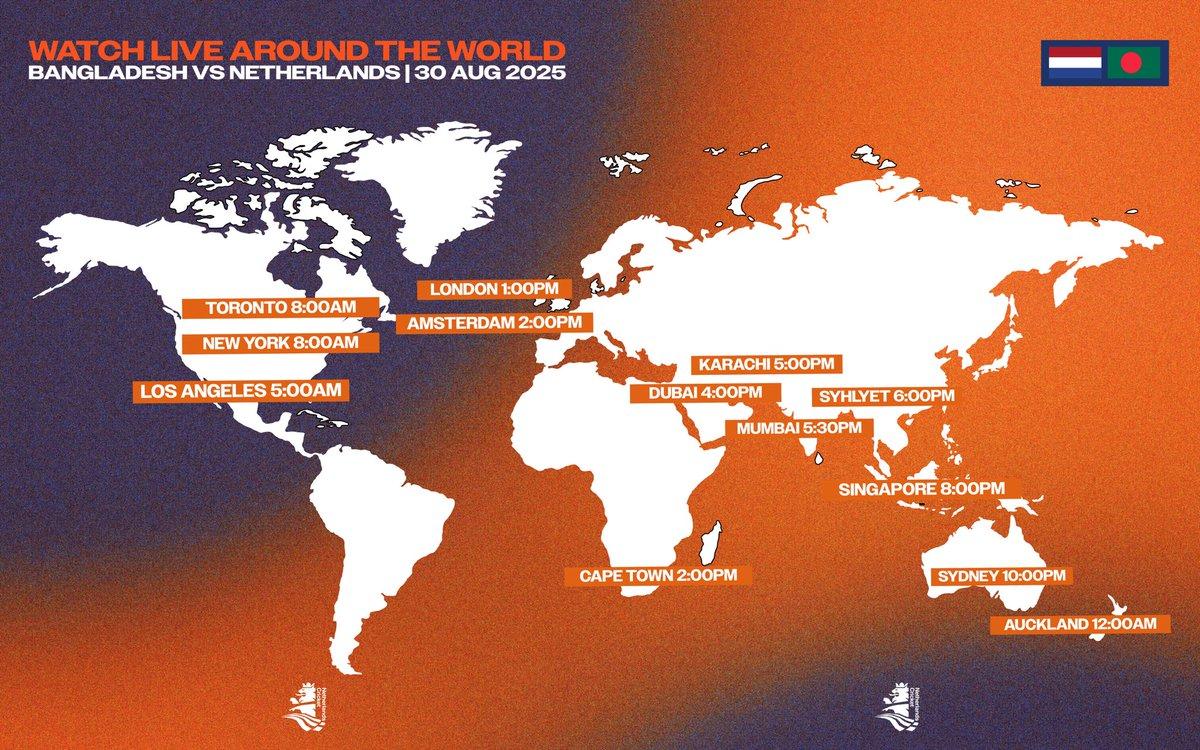
A match scheduled for 7:30 PM seems like simple information until the person viewing it is in a different country from the competition. International sports platforms can display events from cricket leagues in India, football competitions in Europe, basketball in North America and tennis tournaments across several continents on the same screen. Without a clear approach to time zones, a basic fixture list can quickly become confusing.
This is why time zone handling deserves more attention in betting interfaces. Users need to know when an event starts in a way that relates to their own day, not only to the location where the match takes place. Clear local-time conversion, visible time-zone settings and consistent timestamps can remove uncertainty from schedules without making the interface more complicated.
Sports Schedules Are Increasingly International
A betting platform is rarely limited to competitions taking place in one region. Even someone primarily interested in cricket may follow tournaments played across India, Australia, England, South Africa, the Caribbean and other locations. The difference between those time zones can be substantial, and some events may begin on a different calendar date for users elsewhere.
The same problem appears when several sports are combined. A user might follow an afternoon football match in Europe, an evening cricket fixture in Asia and a basketball game in the United States. Displaying every event according to its venue’s local time would force the user to perform repeated conversions just to understand the schedule.
Converting events into one consistent time zone makes the list easier to scan. Instead of thinking about where each competition takes place, the user can concentrate on when the event begins relative to their own schedule.
Automatic Local Time Is Useful but Should Be Visible
The easiest solution is often to detect the user’s time zone and automatically convert event times. If a match begins at 18:00 in another region, the platform can display the corresponding local time for the person viewing the page.
The conversion itself should not be completely invisible, however. A small label such as Local Time, GMT+3 or the relevant time-zone abbreviation can remove ambiguity. This becomes particularly useful when someone is travelling, using a device configured for another region or comparing a sportsbook schedule with a sports website that displays the original event time.
A platform does not need to repeat the time zone beside every fixture. A clear indicator near the schedule or in the account settings can establish which convention is being used across the interface.
Manual Time Zone Controls Still Have a Purpose
Automatic detection works well in many situations, but some users may prefer manual control. Someone travelling abroad might want the platform to continue displaying times according to their home location. Another user may regularly follow an overseas league and prefer to view schedules in the competition’s standard time zone.
Providing a selectable time-zone preference can accommodate both situations. The setting does not need to be complicated: a simple choice between automatic local time and a manually selected zone may be enough.
| Time display option | Useful when |
|---|---|
| Automatic local time | Everyday use on the current device |
| Home time zone | Travelling while following a familiar schedule |
| Event local time | Following a competition in its original context |
| UTC/GMT | Comparing information across several services |
The important point is consistency. Once a user selects a preference, fixtures, account records and other time-sensitive information should follow it wherever practical.
Date Changes Can Be More Confusing Than Hour Changes
Time-zone differences do not only change the hour. They can also change the date. An event listed for late Saturday evening in one country might begin early Sunday morning somewhere else.
That distinction matters on interfaces organized around headings such as Today, Tomorrow or specific calendar dates. A match placed under Saturday according to venue time but shown as 1:30 AM in the user’s local time creates an obvious contradiction. The numerical conversion may be correct while the surrounding navigation remains misleading.
Platforms therefore need to convert both the clock and the calendar context. If an event becomes a Sunday fixture in the selected time zone, it should normally appear under Sunday in a locally organized schedule. This becomes especially important around midnight, when even a relatively small time difference can move an event into another day.
Daylight Saving Time Adds Another Layer
Fixed manual calculations become less reliable when daylight saving time is involved. Some countries move their clocks during part of the year, others do not, and the dates of those changes are not universal.
A user who remembers that one city is normally five hours behind another may discover that the difference temporarily becomes four hours. Sports schedules themselves have not changed, but the relationship between the two locations has.
Modern platforms can handle these changes automatically when they work with proper regional time-zone data rather than fixed offsets alone. From the user’s perspective, the ideal result is uneventful: the displayed match time simply remains correct when clocks change.
This is one reason why a label based only on a permanent-looking numerical offset can sometimes be less informative than a properly managed regional time-zone setting.
Time Zones Affect More Than Match Start Times
Fixtures are the most obvious example, but betting accounts contain many other timestamps. Bet placement records, transaction histories, settlement information, account activity and support messages may all include a date and time.
If different parts of the platform use different conventions, comparing those records becomes unnecessarily difficult. A bet history might show local time while a transaction page uses UTC, for example. Unless both are clearly labelled, two actions that happened minutes apart can appear to have occurred hours apart.
Consistency is therefore as important as conversion. A platform should have a predictable approach to time across its major interfaces and make exceptions clear when another standard has to be used.
This is particularly useful when users review older account activity. The timestamp should provide context rather than create another detail that needs to be interpreted.
Live Events Need a Different Kind of Time Information
Once an event starts, the scheduled start time becomes less important and live status takes over. At this point, platforms may show information such as Live, the current match clock, an innings or an event-specific progress indicator.
The distinction between scheduled time and live state should remain clear. If a cricket match was expected to begin at 14:00 but started later because of weather, continuing to emphasize only the original start time can be misleading. The interface should indicate that the event is now live or delayed rather than making users infer its current state from the schedule.
Time-zone conversion does not solve delays or interruptions, but it provides a reliable foundation. The scheduled time answers when the event was expected to begin for the user, while live status explains what is happening now.
Clear Time Display Can Reduce Schedule Mistakes
A well-designed time-zone system should mostly disappear into the background. Users should not have to think about UTC offsets every time they open a match page. They should simply see a schedule that makes sense in their chosen context.
Problems become noticeable when that system is inconsistent. A match appears under the wrong date, a notification seems to arrive before the displayed start time or an account timestamp does not match another record. Each issue may be small, but together they make the platform harder to trust and navigate.
Clear time-zone controls address the problem by giving users both convenience and context. Automatic conversion handles the routine work, while a visible setting explains which time standard the interface is using.
Time Is Part of Sports Information
Sports platforms contain increasingly detailed information about teams, players, markets, statistics and live events. Time may look like one of the simplest pieces of that interface, but international coverage makes it surprisingly complex.
A useful system does not need to expose that complexity to the user. It needs to convert schedules correctly, handle calendar-date changes, account for regional clock adjustments and apply the selected convention consistently across relevant parts of the platform.
When those elements work together, users can understand when an event takes place without performing their own calculations. For a platform covering sports across multiple countries and continents, that makes time-zone handling a practical part of clear interface design rather than just a technical setting.